The real Java Edition, not a mobile rewrite
PojavLauncher runs the same game jar Mojang ships to desktop players. Worlds, mods, resource packs and server compatibility all behave the way they do on a PC, because it is the same game underneath.
PojavLauncher brought Minecraft Java Edition to Android and iOS by pairing mobile Java runtimes with a graphics translation layer and touch controls. The original project is now discontinued, so this site focuses on legacy setup help, troubleshooting and safe links to the archived repositories.
Before you start: the launcher starts the game, it does not license it. A Microsoft account that already owns Minecraft Java Edition is required.
Minecraft Java Edition was written for computers. It expects a Java virtual machine and desktop OpenGL, neither of which a phone provides. PojavLauncher fills both gaps: it ships its own Java runtimes and a translation layer that converts the game's graphics calls into ones a mobile GPU can execute. Everything above that layer is the unmodified game.
It is not a copy of Minecraft, a cracked client or a way to play without buying the game. It contains no game files at all. When you sign in, the assets download from Mojang's servers under your own licence, exactly as they would on a desktop launcher.
The original PojavLauncher team published the code and release history in public repositories. Those repositories were archived in September 2025 and are now read-only; the successor project is Amethyst. For legacy PojavLauncher files, use the archived project pages rather than repackaged download sites.
Legacy downloads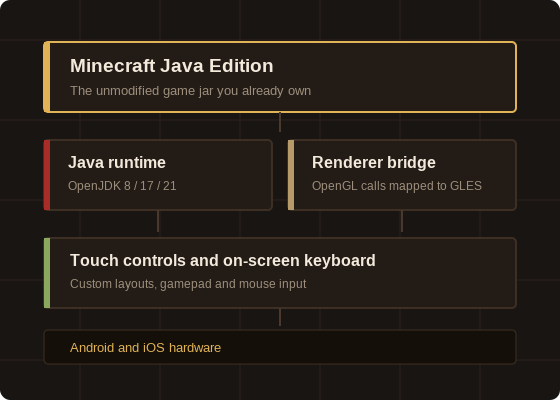
Eight capabilities that separate a Java Edition launcher from a mobile port of the game.
PojavLauncher runs the same game jar Mojang ships to desktop players. Worlds, mods, resource packs and server compatibility all behave the way they do on a PC, because it is the same game underneath.
Legacy builds include multiple OpenJDK runtimes. The right runtime still depends on the Minecraft version you are launching, so check the Java guide before changing other settings.
Desktop graphics calls are translated to the mobile equivalents your GPU understands, with more than one translation layer available so you can pick whichever suits your chipset.
Install either loader from inside the launcher and drop mod jars into the mods folder. Version matching is strict, but the workflow is the same one desktop players already know.
Every on-screen button is a mapped keystroke. Move it, resize it, change its opacity or delete it, then export the finished layout and reuse it on another device.
Bluetooth peripherals are recognised without extra software. A tablet with a keyboard and mouse gets remarkably close to a desktop set-up.
The source and issue history remain public in the archived repositories, which makes it possible to inspect how the launcher handled login, runtimes and game startup.
Java Edition servers do not care which device connected. Join the same worlds and communities you would from a computer, with the same mod requirements.
The full sequence takes about twenty minutes, most of it spent waiting for game assets to download.
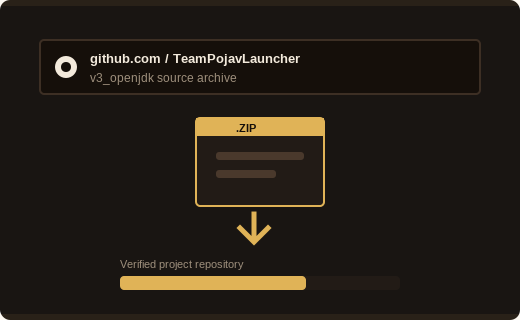
Open the archived releases page and choose the installable build for your platform. A source-code ZIP is not an APK or IPA and cannot be installed directly.
On first launch the launcher installs its OpenJDK runtimes and asks for storage access. Grant it, or mod and world imports will fail later.
Authenticate with the Microsoft account that owns Java Edition, then download a game version. Start with 1.12.2 or 1.16.5.
Set memory to about half your device RAM, drop render distance to six to eight chunks, adjust your control layout and load a world.
Support and playability are different things. This is where each platform genuinely lands.
| Platform | Status | Notes |
|---|---|---|
| Android 8.0+ (64-bit) | Supported | Primary platform. 4 GB RAM minimum, 6–8 GB recommended for newer versions. |
| Android 5.0 – 7.1 | Limited | May install, but runtime and renderer failures are common. Not recommended. |
| iOS & iPadOS 14+ | Supported | Sideload only. Certificate expiry applies and JIT affects performance. |
| Chromebook (Android apps) | Varies | Works on some models. Keyboard and mouse input is a real advantage where it does. |
| Windows, macOS, Linux | Not intended | Java runs natively on desktop. Use a desktop launcher instead. |
Version choice affects performance more than any in-game setting. This is how the commonly played releases behave on mid-range hardware.
| Version | Runtime | Mobile performance | Best suited to |
|---|---|---|---|
| 1.8.9 | Java 8 | Excellent, runs on 3 GB devices | PvP servers and old combat mechanics |
| 1.12.2 | Java 8 | Excellent | Large established Forge mod packs |
| 1.16.5 | Java 8 | Very good | The usual all-round recommendation |
| 1.18 – 1.20.1 | Java 17 | Workable on 6–8 GB devices | Newer terrain generation and blocks |
| 1.20.5 and later | Java 21 | Demanding on mobile hardware | Only where the legacy build and renderer support that game version |
Six situations where a mobile Java Edition launcher solves a real problem.
Join the same survival, SMP and minigame servers your friends use on desktop, without a second account or a Bedrock port.
Copy a save folder across and keep building on a tablet. The world format is identical on both platforms.
Fabric performance mods and light content packs run well on an eight gigabyte tablet with a controller attached.
1.8 era combat mechanics are unavailable on Bedrock. Here they run exactly as they always have.
Command blocks, datapacks and structure blocks all behave as Java Edition features, which they are not on mobile Bedrock.
Travel, shared computers or a broken laptop stop being a reason to lose access to your worlds.
The original TeamPojavLauncher repositories are archived and no longer supported. Use the official archived releases page for legacy files. If you want actively maintained successor software, the former team points users to Amethyst.
Official archive: https://github.com/PojavLauncherTeam/PojavLauncher/releases • Successor: Amethyst Android
Android and iOS share the same launcher but reach it by different routes.
The original source is public, but the project is no longer maintained. For a legacy install, start from the archived repository and avoid repackaged APKs from download portals. Treat any unexpected login screen or unusual permission request as a reason to stop and verify the file.
This site is an independent guide. It is not operated by the PojavLauncher developers, Mojang Studios or Microsoft.
The useful parts and the limitations, without treating an archived project like a current release.
The public history is still available, but active PojavLauncher development has ended.
The PojavLauncherTeam organization was archived on 23 September 2025. Its repositories point to AngelAuraMC / Amethyst as the successor.
A proof of concept that Minecraft Java Edition could run on Android at all, limited to old versions and barely playable frame rates.
Improved OpenGL translation brought newer game versions into reach and made mid-range devices viable rather than theoretical.
Multiple bundled OpenJDK runtimes, better account handling and mod loader installation from inside the launcher.
A parallel build for Apple devices, distributed by sideloading because store rules do not permit a listing.
Each one has a specific cause. Work through the likely cause before reinstalling anything.
The graphics translation layer failed to start on your GPU.
Switch to the other renderer option in launcher settings, remove any shader packs and retest with 1.12.2.
The selected Java runtime is older than the game version requires.
Move to Java 17 for 1.17–1.20.4 or Java 21 for 1.20.5 and newer, then relaunch.
Android reclaimed memory from the launcher process.
Lower allocated RAM to about half your device total and cut render distance to six chunks.
The Microsoft redirect is being blocked, usually by a network.
Clear the launcher cache and retry on a different connection, avoiding captive portals.
Files are in the wrong folder or the loader does not match.
Place jars in .minecraft/mods, confirm the loader type and check every mod targets your exact game version.
Memory allocation is too low, so the runtime pauses to collect garbage.
Raise allocation in small steps, disable clouds and cap the frame rate for a steadier result.
Longer walkthroughs for installation, mods, performance and the errors people hit most.
From the APK install to your first world load, here is the full Android setup sequence with the storage, runtime and account details people usually miss.
Read the guide
Mod loaders work on mobile, but version matching is unforgiving. Here is the pairing logic, the install order and the memory maths behind stable mod packs.
Read the guide
Black screen, instant crash, login loop or silent close — each has a short list of likely causes. Work through them in order rather than reinstalling.
Read the guideTwenty answers covering setup and compatibility first, then safety, mods and performance.
PojavLauncher is an open-source launcher that runs Minecraft Java Edition on Android and iOS. It supplies a Java runtime, translates the game's desktop graphics calls into mobile ones and adds touch controls, so the desktop version of the game runs on a phone or tablet. Everything above that translation layer is the unmodified game, which is why worlds, mods and servers behave exactly as they do on a computer.
Yes. The launcher starts the game but does not license it. You sign in with a Microsoft account that already owns Java Edition, and the game files are downloaded from Mojang's own servers as usual. If the account has never owned the game, sign-in will succeed but no version will be downloadable.
Android 8.0 and newer on 64-bit hardware is the practical requirement. Android 5.0 to 7.1 devices may install the app but frequently fail on the Java runtime or the graphics bridge. Even where an older device starts the game, the experience is usually poor enough that a lighter Minecraft version is the only workable option.
Four gigabytes is the realistic floor for older Minecraft versions, and six to eight gigabytes makes newer releases and light mod packs comfortable. The reason is allocation headroom: the launcher needs a block of memory the system will not reclaim mid-session, so half your device total is the working ceiling.
No. Apple's rules do not permit an app that runs downloaded code in this way, so iOS installs happen through sideloading with a signing certificate. A free Apple ID gives a seven-day certificate and a paid developer account gives a year, which is why the app sometimes stops opening after a few days.
The archived Android project documented support across a very wide range of Minecraft versions, including releases up to the 1.21-era snapshots available before the project was retired. Exact compatibility depends on the PojavLauncher build, Java runtime and renderer, so treat older versions such as 1.12.2 or 1.16.5 as the easier starting point.
Java 8 for Minecraft 1.8 to 1.16.5, Java 17 for 1.17 to 1.20.4 and Java 21 for 1.20.5 and newer. An unsupported class version error at launch always means this setting is wrong. Mod loader profiles follow the game version rather than the loader's own release date.
Around three gigabytes covers the launcher, the Java runtimes, one game version and its assets. Additional versions, mod packs and resource packs add to that quickly, and Android behaves unpredictably when free space runs low, so keeping a couple of gigabytes spare avoids failures that look like launcher bugs.
Yes. The save format is identical across Java Edition platforms, so copying a world folder into the saves directory works in both directions. Keep the game versions aligned and install the same mods on both devices, otherwise chunks containing modded blocks will not load correctly.
The initial sign-in and asset download need a connection. Once a version is fully downloaded and the session token is valid, single-player worlds can be played offline. Tokens do expire eventually, so an occasional online launch is needed to refresh them.
The original source code is public, but PojavLauncher is no longer maintained. For a legacy install, use the archived repository as your reference and avoid third-party APKs you cannot verify. If a build shows an unexpected login form or asks for unrelated permissions, stop and check the file before continuing.
The launcher itself does not trigger bans. Cheat or hack mods loaded through it absolutely can, exactly as they would on desktop, and most servers detect them the same way regardless of which device connected. Using an unlicensed account is a separate problem and will normally be blocked at the server login stage anyway.
Both mod loaders are supported. Install the loader first, launch once with no mods to confirm it works, then add mods whose game version and loader type match exactly. Mixing Forge and Fabric jars in one profile crashes the game on launch, and most Fabric mods also need the Fabric API jar present.
This almost always means the graphics translation layer failed to initialise on your GPU rather than a broken install. Switching to a different renderer option in launcher settings resolves most cases. Removing desktop shader packs, which cannot run through the bridge, resolves the majority of the rest.
The operating system reclaimed memory from the launcher process. Lower the allocated RAM to around half your device total and reduce render distance; raising the allocation makes this failure more likely rather than less, because it leaves Android with too little to work with.
Render distance of six to eight chunks, Fast graphics, clouds off and a capped frame rate. Before any of that, test both renderer options, because the difference between them on the same device is often larger than every in-game setting combined. Choosing an older game version is the biggest single gain on a 4 GB phone.
Yes. Bluetooth keyboards, mice and most standard gamepads are recognised without extra software. On a tablet with a stand this gets close to a desktop experience, and keeping a separate gamepad layout means switching between touch and controller takes a couple of taps.
Fully. Every on-screen button is a mapped keystroke that can be moved, resized, relabelled, given multiple keys or deleted outright. Finished layouts export as files, so you can back one up before a reinstall and reuse it on another device.
It is built for mobile operating systems and offers nothing useful on a desktop, where Java already runs natively. Running it inside an Android emulator works but stacks translation layers on top of each other and performs worse than any native desktop launcher. Worlds still move freely between phone and PC.
PojavLauncher was free and open source, but the original volunteer team archived the project in September 2025. The repositories and issue history remain public for reference; new support and development moved on to successor projects.